Even though I never watch TV, I have one at home. It stays there turned off for months, and I occasionally turn it on to watch a movie with the family from a USB stick or on Prime Video. It has always been painfully slow, bloated with all sorts of features, previews, recommendations and services I neither need nor care about. This is what it looks like:
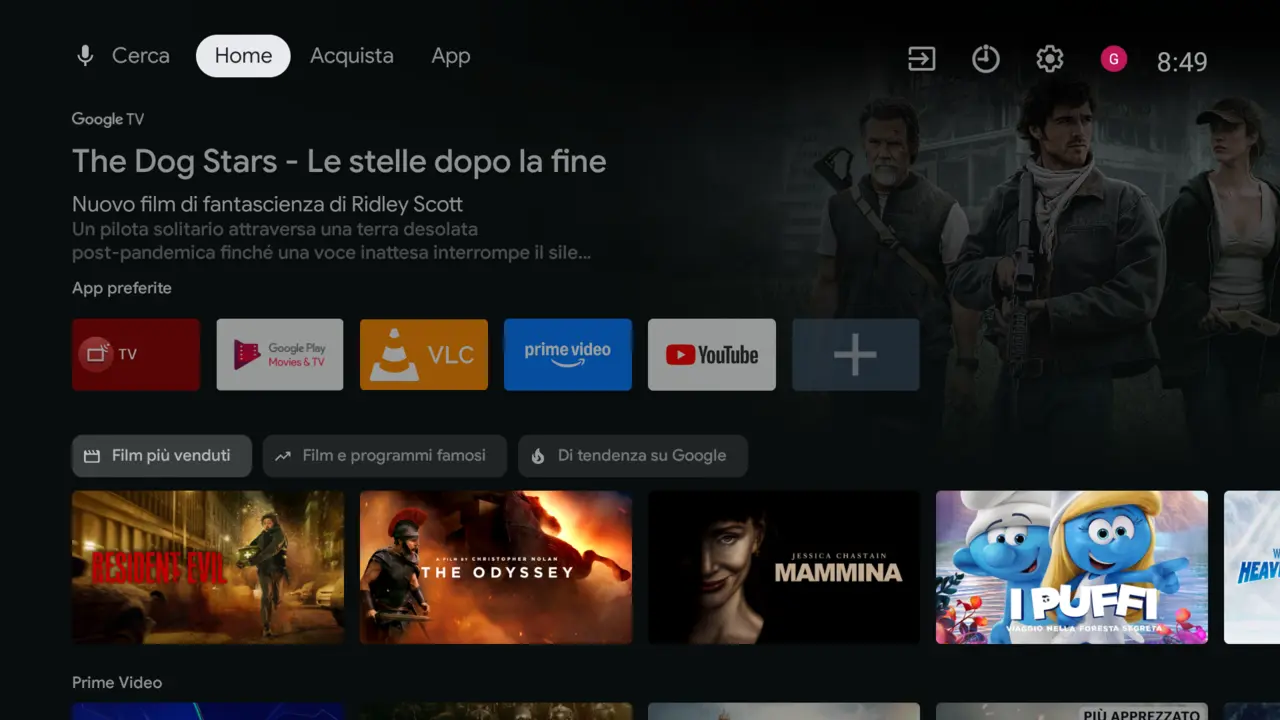
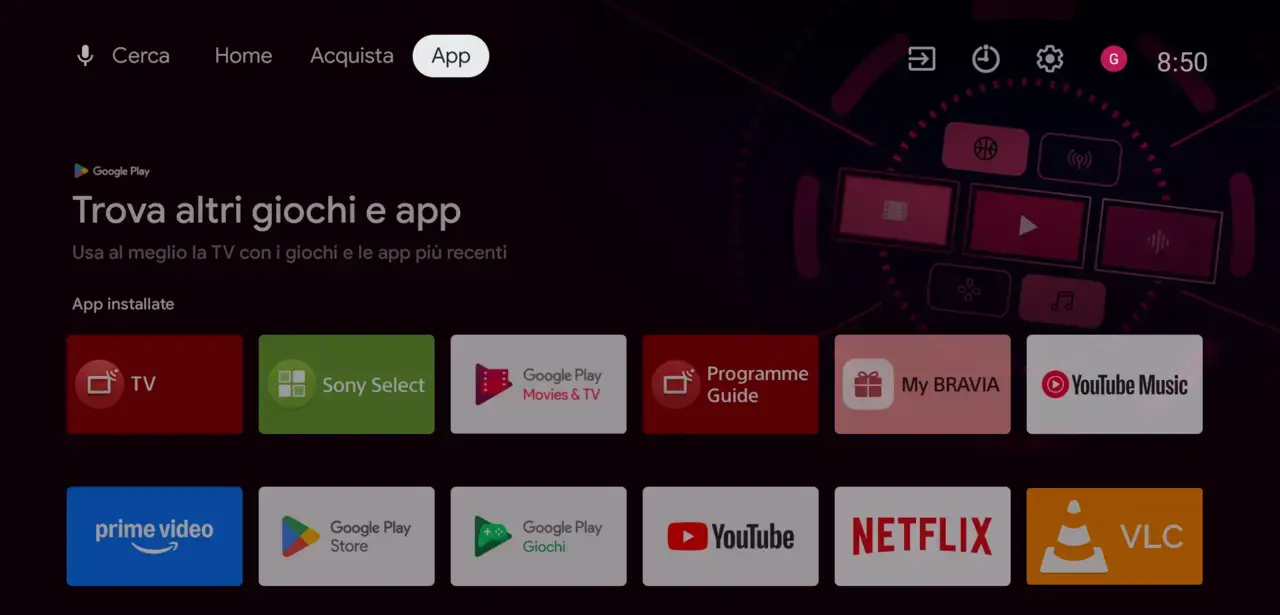
As an experiment, I decided to see how much of this stuff I could get rid of and whether it would make the old TV any faster.
Setup
This Sony TV (model KD-49XD7005, from 2016) runs on Android TV 9. It has a "developer mode" which lets you talk to the TV over Wi-Fi. To enable it:
- go to
Settings→Device Preferences→About, then pressBuild7 times - go back to
Device Preferences→Developer optionsand enableDebug ADB
Then, from the laptop you can install a CLI tool called adb, and talk to the
TV (more
here and
here):
$ sudo apt install adb
$ adb connect 10.0.0.7:5555
The TV will show a prompt, asking if you want to allow access. Say "yes". At this point you can send commands to the TV, e.g.
$ adb shell top -m 15            # live CPU / processes
$ adb shell dumpsys meminfo      # RAM per app
$ adb shell pm list packages     # all installed apps / packages
The bloat
The first thing I did was to list the installed packages:
$ adb shell pm list packages | wc -l
179
$ adb shell pm list packages
package:com.android.cts.priv.ctsshim
package:com.sony.dtv.braviasyncmenu
package:com.uei.quicksetsdk.sony
package:com.sony.dtv.b2b.noderuntime.normal
package:com.google.android.ext.services
...
The only app I installed myself is VLC. The rest is apparently Android itself
plus a lot of Sony packages which make it a TV (tuner, inputs, picture
settings). Sony adds its own ads (promos and sonyselect), a user manual, a
demo mode, a customer support app. And then there's third-party stuff like
Netflix, YouView and Samba TV, which
looks at what you're watching and sells it to advertisers.
Then there's Google with its own bloat: Play Movies, Play Games, YouTube Music, a voice assistant, a text-to-speech engine and a "recommendations" service which fills the home screen with things to watch.
None of this is stuff I ever asked for or use.
In order to see how much of this actually runs, I rebooted the TV. It took 2 and a half minutes to get to the home screen. Then I left it alone for a day, in standby. After that, 347 processes were running, and the memory looked like this:
$ adb shell dumpsys meminfo
Total PSS by process:
    131,047K: com.google.android.gms (pid 18248)
     95,725K: system (pid 2246)
     92,753K: dtv_svc (pid 1687)
     77,749K: com.google.android.tvlauncher (pid 3411 / activities)
     73,195K: com.google.android.backdrop (pid 19851)
     71,124K: com.android.vending (pid 21616)
     59,342K: com.netflix.ninja (pid 14291)
     51,910K: com.google.android.webview:sandboxed_process0 (pid 19971)
     32,281K: com.sony.dtv.discovery (pid 3361)
     24,727K: com.google.android.apps.mediashell (pid 5358)
     ...
Total RAM: 1,993,356K (status normal)
 Free RAM:   541,568K
 Used RAM: 1,397,822K
That's 1.40 GB used out of 2 GB. Google Play services (gms) alone takes 131
MB, the screensaver (backdrop) 73 MB, the Play Store 71 MB, and Netflix 59
MB, even though nobody opened it.
With Prime Video open it gets worse: 1.52 GB used, and only about 290 MB left for apps. Prime alone takes 281 MB, Google's home screen grows to 137 MB, and Netflix, the screensaver, voice search and Sony's "Discover" are all still in memory, even though nobody is using them.
What to remove
Since all I do with this TV is watch movies from a USB stick or Prime Video, most of this stuff is useless to me. I asked Claude Code which of these packages could be safely removed, a chunk at a time. It started with the obvious stuff: Sony's ads, Samba TV, Netflix, YouTube Music, Play Games, Play Movies, the demo mode, the user manual. I basically said "remove all" 4 times in a row, and went from 179 to 109 packages (plus a few more later on, see the full list). To uninstall a package:
$ adb shell pm uninstall --user 0 com.sony.dtv.promos
Success
Note that this doesn't really delete the app. It stays where it is: Android just hides it for the user (its data is wiped, though). If you change your mind you can bring it back with:
$ adb shell cmd package install-existing com.sony.dtv.promos
A couple of times I restarted the TV to check that everything still worked, and it did.
Replacing Google
After removing the bloat I decided to also remove Google stuff, including Google's home screen, the Play Store and YouTube. The tricky one here is the home screen: the new one has to be installed before removing Google's, otherwise the TV boots into an empty screen.
I replaced the home screen with LtvLauncher (very lightweight), YouTube with SmartTube (no ads!), and the Play Store with Aurora Store, which doesn't need a Google account. None of them comes from the Play Store. I downloaded and manually installed the APKs with:
$ curl -LO https://github.com/leanbitlab-org/LtvLauncher/releases/download/v2026.11.23/LTvLauncher-armeabi-v7a-release.apk
$ adb install LTvLauncher-armeabi-v7a-release.apk

$ curl -LO https://github.com/yuliskov/SmartTube/releases/download/32.80s/SmartTube_stable_32.80_armeabi-v7a.apk
$ adb install SmartTube_stable_32.80_armeabi-v7a.apk

$ curl -LO https://f-droid.org/repo/com.aurora.store_76.apk
$ adb install com.aurora.store_76.apk
At this point I got rid of Google Play services, the Play Store, YouTube and Google's home screen (a few more Google packages went too, see the full list):
$ adb shell pm uninstall --user 0 com.google.android.gms
$ adb shell pm uninstall --user 0 com.android.vending
$ adb shell pm uninstall --user 0 com.google.android.youtube.tv
$ adb shell pm uninstall --user 0 com.google.android.tvlauncher
Installing LtvLauncher alone is not enough to make it the home screen: Google's launcher wins until it's removed. After that, the Home button goes straight to LtvLauncher.
To bring one back: adb shell cmd package install-existing
com.google.android.gms. With all this gone I lost casting from the phone
(Chromecast) and voice search from the remote (something I never used anyway).
Prime Video, on the other hand, works fine without Google Play services.
Results
| Metric | Stock | Debloated | Change |
|---|---|---|---|
| Installed packages | 179 | 89 | -50% |
| Running processes | 347 | 327 | -6% |
| Boot time | 150 secs | 85 secs | -43% |
| RAM used (idle) | 1.40 GB | 0.97 GB | -31% |
| RAM free (idle) | 0.54 GB | 1.09 GB | +102% |
| RAM used (Prime Video running) | 1.52 GB | 1.10 GB | -28% |
| RAM available (Prime Video running) | 0.29 GB | 0.90 GB | +210% |
| Launcher PSS | 78 MB | 57 MB | -27% |
This is the new home screen. No recommendations, no ads, no nothing. Just a list of apps.
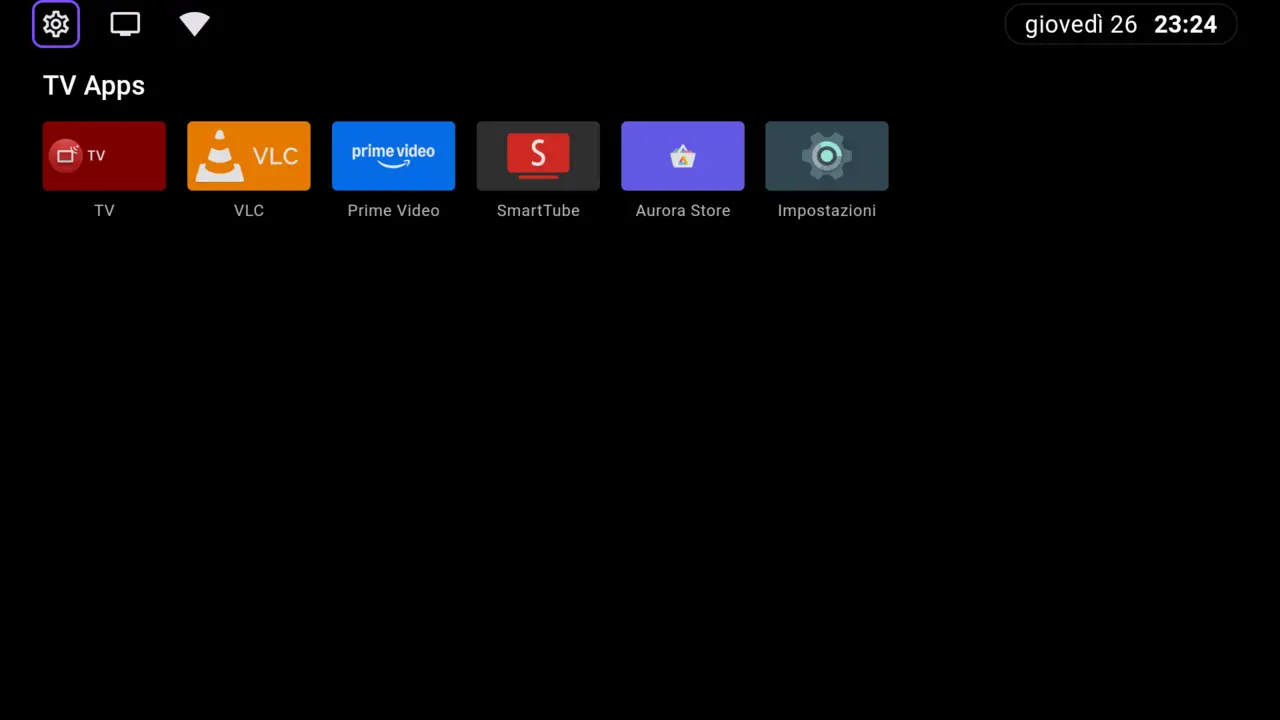
Does it feel faster? Yes, noticeably faster. With the stock firmware, apps like Prime Video and VLC were slow and sometimes completely unresponsive, presumably due to the little available RAM. Even navigating between menus was a pain. Everything I use still works: Prime Video, SmartTube and VLC.
It turns out the hardware itself is still perfectly adequate, even 10 years later. It was the software that made the TV feel old and sluggish. None of this required root access, and a factory reset would bring back all the original system apps, which is quite reassuring.
NOTE: when you're done, remember to turn Debug ADB off again from the TV, as
it exposes an ADB port on your local network.
The full list
This is what I removed on my Sony Bravia KD-49XD7005, running Android TV 9. This list is specific to my use case, which is total minimalism. I literally use 3 apps: SmartTube, VLC and Prime Video. It's likely that some of these packages provide functionality you actually need, so don't blindly uninstall all of them. Also, the Google list removes Google's home screen, so install another one first (see Replacing Google), or the TV boots into an empty screen.
Sony:
adb shell pm uninstall --user 0 com.sony.dtv.b2b.hotelmode  # hotel mode
adb shell pm uninstall --user 0 com.sony.dtv.b2b.noderuntime.normal  # node.js for pro mode
adb shell pm uninstall --user 0 com.sony.dtv.b2b.noderuntime.privilege  # node.js for pro mode
adb shell pm uninstall --user 0 com.sony.dtv.bivlinfo  # old Bravia Internet Video info
adb shell pm uninstall --user 0 com.sony.dtv.browser.ceb  # Sony embedded browser (?)
adb shell pm uninstall --user 0 com.sony.dtv.browser.webappruntime  # Sony web app runtime
adb shell pm uninstall --user 0 com.sony.dtv.browser.webappruntimeextension  # Sony web app runtime
adb shell pm uninstall --user 0 com.sony.dtv.browser.webappservice  # Sony web app runtime
adb shell pm uninstall --user 0 com.sony.dtv.customersupport  # customer support app
adb shell pm uninstall --user 0 com.sony.dtv.da.service  # Device Agent (remote diagnostics)
adb shell pm uninstall --user 0 com.sony.dtv.demomode  # shop demo mode
adb shell pm uninstall --user 0 com.sony.dtv.demosupport  # shop demo mode
adb shell pm uninstall --user 0 com.sony.dtv.dialservice  # DIAL (phone apps launch TV apps)
adb shell pm uninstall --user 0 com.sony.dtv.discovery  # Sony "Discover" suggestions
adb shell pm uninstall --user 0 com.sony.dtv.handlingirblaster  # IR blaster (control a set-top box)
adb shell pm uninstall --user 0 com.sony.dtv.hbbtvlauncher  # HbbTV (broadcast "red button")
adb shell pm uninstall --user 0 com.sony.dtv.hddmgr  # USB HDD recording
adb shell pm uninstall --user 0 com.sony.dtv.homenetwork  # browse a media server (NAS)
adb shell pm uninstall --user 0 com.sony.dtv.HomeTheatreControl  # Sony soundbar control
adb shell pm uninstall --user 0 com.sony.dtv.imanual  # built-in user manual
adb shell pm uninstall --user 0 com.sony.dtv.interactivetvutil  # Sony usage logs
adb shell pm uninstall --user 0 com.sony.dtv.interactivetvutil.output  # Sony usage logs
adb shell pm uninstall --user 0 com.sony.dtv.irblaster  # IR blaster
adb shell pm uninstall --user 0 com.sony.dtv.irbservice  # IR blaster
adb shell pm uninstall --user 0 com.sony.dtv.multiscreendemo  # shop demo
adb shell pm uninstall --user 0 com.sony.dtv.networkapp.wifidirect  # Wi-Fi Direct
adb shell pm uninstall --user 0 com.sony.dtv.osat.music  # Sony music player
adb shell pm uninstall --user 0 com.sony.dtv.privacypolicy  # privacy policy screen
adb shell pm uninstall --user 0 com.sony.dtv.promos  # Sony promotions (ads)
adb shell pm uninstall --user 0 com.sony.dtv.quicksetup  # first-run setup
adb shell pm uninstall --user 0 com.sony.dtv.QuickSetupCustomizer  # first-run setup
adb shell pm uninstall --user 0 com.sony.dtv.rcplayer  # player for USB recordings (?)
adb shell pm uninstall --user 0 com.sony.dtv.rcplayer.service  # player for USB recordings (?)
adb shell pm uninstall --user 0 com.sony.dtv.reminderservice  # programme reminders
adb shell pm uninstall --user 0 com.sony.dtv.remoteaccess  # control from phone apps
adb shell pm uninstall --user 0 com.sony.dtv.seconddispsetting  # phone remote registration
adb shell pm uninstall --user 0 com.sony.dtv.smarthelp  # help app
adb shell pm uninstall --user 0 com.sony.dtv.smarthomesettings  # Alexa / Google Home
adb shell pm uninstall --user 0 com.sony.dtv.smartmediaapp  # Sony USB media player
adb shell pm uninstall --user 0 com.sony.dtv.softwarelicense  # software licenses screen
adb shell pm uninstall --user 0 com.sony.dtv.sonybugreportsys  # bug reports to Sony
adb shell pm uninstall --user 0 com.sony.dtv.sonyloglevelsettingsys  # log settings (technicians)
adb shell pm uninstall --user 0 com.sony.dtv.sonyloglevelsettingvnd  # log settings (technicians)
adb shell pm uninstall --user 0 com.sony.dtv.sonyselect  # Sony Select (app ads)
adb shell pm uninstall --user 0 com.sony.dtv.sonyselect.overlay  # Sony Select (app ads)
adb shell pm uninstall --user 0 com.sony.dtv.systemupdate  # no more firmware updates (last one in 2023)
adb shell pm uninstall --user 0 com.sony.dtv.timers  # timers and clock
adb shell pm uninstall --user 0 com.sony.dtv.tuningconfirmation_dvbs  # satellite tuning
adb shell pm uninstall --user 0 com.sony.dtv.tvlaunchercustomizer  # Sony tweaks to Google's home
adb shell pm uninstall --user 0 com.sony.dtv.tvlaunchercustomizer.overlay.apporder  # app order on Google's home
adb shell pm uninstall --user 0 com.sony.dtv.tvxlauncher.programguide  # programme guide
adb shell pm uninstall --user 0 com.sony.dtv.tvxlauncher.titlelist  # list of USB recordings
adb shell pm uninstall --user 0 com.sony.dtv.usbmsgservice  # "USB connected" popups
adb shell pm uninstall --user 0 com.sony.dtv.webapi.core  # Sony REST API (network control)
adb shell pm uninstall --user 0 com.sony.dtv.youview  # YouView (UK only)
adb shell pm uninstall --user 0 com.sony.huey.dlna.module  # DLNA
adb shell pm uninstall --user 0 com.sony.huey.dlna.renderersettings  # DLNA
adb shell pm uninstall --user 0 com.sonyericsson.dlna  # DLNA
Third-party:
adb shell pm uninstall --user 0 com.netflix.ninja  # Netflix
adb shell pm uninstall --user 0 com.qterics.da.product  # Device Agent (remote diagnostics)
adb shell pm uninstall --user 0 com.uei.quicksetsdk.sony  # IR blaster device database
adb shell pm uninstall --user 0 com.vewd.core.integration.dia  # Vewd (ex Opera TV) browser
adb shell pm uninstall --user 0 com.vewd.core.service  # Vewd (ex Opera TV) browser
adb shell pm uninstall --user 0 com.youview.tv.servicehost  # YouView (UK only)
adb shell pm uninstall --user 0 screnmirroring.com  # Miracast screen mirroring
adb shell pm uninstall --user 0 tv.samba.ssm  # Samba TV (ad tracking)
Google:
adb shell pm uninstall --user 0 com.android.vending  # Play Store
adb shell pm uninstall --user 0 com.google.android.apps.mediashell  # Chromecast
adb shell pm uninstall --user 0 com.google.android.backdrop  # Ambient mode screensaver
adb shell pm uninstall --user 0 com.google.android.backuptransport  # backup to the Google account
adb shell pm uninstall --user 0 com.google.android.feedback  # send feedback to Google
adb shell pm uninstall --user 0 com.google.android.gms  # Google Play services
adb shell pm uninstall --user 0 com.google.android.gsf  # Google Services Framework
adb shell pm uninstall --user 0 com.google.android.katniss  # voice search / Assistant
adb shell pm uninstall --user 0 com.google.android.leanbacklauncher  # old Android TV home screen
adb shell pm uninstall --user 0 com.google.android.marvin.talkback  # TalkBack screen reader
adb shell pm uninstall --user 0 com.google.android.onetimeinitializer  # runs once at first setup
adb shell pm uninstall --user 0 com.google.android.partnersetup  # Google partner setup
adb shell pm uninstall --user 0 com.google.android.play.games  # Play Games
adb shell pm uninstall --user 0 com.google.android.speech.pumpkin  # offline voice commands
adb shell pm uninstall --user 0 com.google.android.sss.authbridge  # setup from the phone
adb shell pm uninstall --user 0 com.google.android.syncadapters.calendar  # Google Calendar sync
adb shell pm uninstall --user 0 com.google.android.syncadapters.contacts  # Google Contacts sync
adb shell pm uninstall --user 0 com.google.android.tts  # Google text-to-speech
adb shell pm uninstall --user 0 com.google.android.tungsten.setupwraith  # Google setup wizard
adb shell pm uninstall --user 0 com.google.android.tv.bugreportsender  # bug reports to Google
adb shell pm uninstall --user 0 com.google.android.tv.remote.service  # Android TV remote (phone app)
adb shell pm uninstall --user 0 com.google.android.tvlauncher  # Google's home screen (ads)
adb shell pm uninstall --user 0 com.google.android.tvrecommendations  # home screen recommendations
adb shell pm uninstall --user 0 com.google.android.videos  # Play Movies
adb shell pm uninstall --user 0 com.google.android.youtube.tv  # YouTube
adb shell pm uninstall --user 0 com.google.android.youtube.tvmusic  # YouTube Music
Android:
adb shell pm uninstall --user 0 com.android.providers.calendar # calendar storage
Disabled:
adb shell pm disable-user com.sony.dtv.b2b.vendorprotocol # Control4 announcer (persistent)
Settings:
adb shell settings put global window_animation_scale 0.5  # faster animations
adb shell settings put global transition_animation_scale 0.5  # faster animations
adb shell settings put global animator_duration_scale 0.5  # faster animations